
Reviews
Form Builder Art Studio succeeds in delivering a stress-free creative outlet. The range of shapes and expressions allows for surprising variety, from simple faces to elaborate scenes. The interface is clean and responsive, working smoothly on both desktop and mobile. What sets it apart is the total absence of time limits or scoring, which fosters genuine exploration. While it lacks advanced features like layers or export options, its simplicity is a strength for casual users. Ideal for unwinding after a busy day or keeping children engaged in constructive play.
Description
Core Concept and Creative Flow
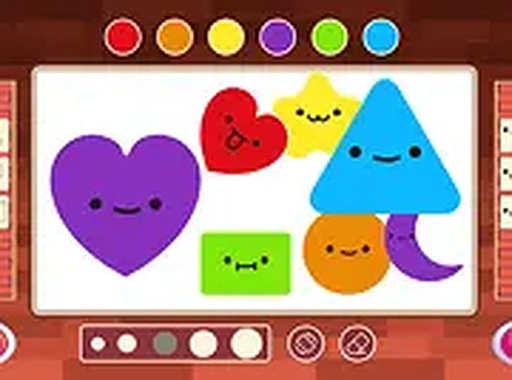
Form Builder Art Studio centers on a simple yet engaging idea: combine basic geometric forms into expressive compositions. Players begin with a blank canvas and a selection of shapes like circles, triangles, and diamonds. The process is entirely self-directed, with no objectives to complete or levels to unlock. This freedom allows for spontaneous experimentation, making each session unique. The interface is intuitive, with shape categories organized neatly on the left side of the screen. Dragging a shape onto the canvas is as easy as clicking or tapping, and adjustments can be made at any time. The lack of constraints encourages players to explore color combinations and spatial arrangements without worrying about mistakes.
Expression and Customization Options
After placing a shape, users can assign a facial expression from a palette of emotions, including cheerful, curious, or sleepy looks. This feature adds personality to each form, transforming simple geometry into characters or elements of a larger story. A color picker lets players fill shapes with various hues, from bright primaries to soft pastels. Shapes can be layered, resized, and rotated to create depth and visual interest. For example, a small star placed inside a larger crescent moon can suggest a night sky. These tools give users control over the final composition, whether they aim for a minimalist design or a detailed scene.
Accessibility and Platform Compatibility
The game runs entirely within a web browser, requiring no downloads or installations. This makes it accessible on both desktop computers and mobile devices, with touch controls optimized for tablets and phones. A full-screen mode is available for those who prefer an immersive view. The interface scales appropriately across screen sizes, ensuring that buttons and menus remain usable. Because there are no timers or scoring systems, players can pause or resume at their convenience. This design makes the experience suitable for short breaks or longer creative sessions.
Creative Strategies and Inspiration
To get the most out of Form Builder Art Studio, consider experimenting with shape layering to build complex images. Combining contrasting colors can make certain elements stand out, while similar tones create harmony. Starting with a simple outline and gradually adding details often leads to satisfying results. Since the game imposes no penalties for changes, users can freely delete or rearrange components. Sharing finished pieces with friends or family can spark new ideas and provide fresh perspectives. The open-ended nature of the activity means that every creation is a personal expression, with no right or wrong outcomes.







Comments
Sign in to comment
You must be logged in before posting a review or rating.
No account? Create one
No comments yet. Be the first to comment!